i was running lighthouse on my site the other day to check performance and out of nowhere a huge red alert popped up saying my site uses third-party cookies (ꐦ°᷄д°᷅)
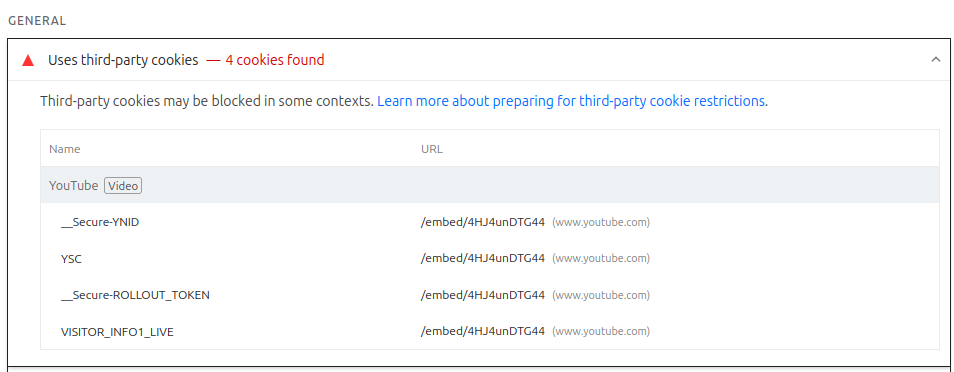
i was like "wat?? my site is static, no analytics, no ads, nothing". then i checked the details and it was the youtube embed. the little video i put on my hobbies page was dropping 4 google tracking cookies on everyone who entered the site.
this happens before the person even clicks play. just by opening the page google already sets YSC, VISITOR_INFO1_LIVE and two more. and this is the default youtube embed. everyone uses it and no one talks about it.
wat the default embed does without u noticing
when u copy the embed code from youtube, it comes out something like this:
<iframe
  src="https://www.youtube.com/embed/ESx_hy1n7HA"
  frameborder="0"
  allowfullscreen
  loading="lazy">
</iframe>
looks innocent right. but that youtube.com domain loads the player together with the whole google tracking machine. it sets cookies, sends ur full referrer, and associates the visit to the users profile if theyre already logged into any google service.
and like, u never asked for this. u just wanted to show a video.
__Secure-YNID, YSC, __Secure-ROLLOUT_TOKEN and VISITOR_INFO1_LIVE. all of them are google tracking cookies, and all of them get set automatically just because the iframe exists on the page.
the first fix (and the most important)
youtube has an alternative domain called youtube-nocookie.com. it was literally made for this. in this mode the player doesnt set any cookie until the user actually interacts with the video, like clicking play.
the swap is ridiculously simple:
src="https://www.youtube.com/embed/ESx_hy1n7HA"

// becomes

src="https://www.youtube-nocookie.com/embed/ESx_hy1n7HA"
thats it. change the domain and done. the player works identically, fullscreen works, picture in picture works, autoplay works. the only difference is that google doesnt spy on ur visitor for free.
i keep wondering why youtube doesnt make this domain the default in the embed button. but then i remember that googles product is u, not the player (⌐■_■)
referrerpolicy and sandbox
after swapping the domain i added two more things to the iframe. referrerpolicy="strict-origin-when-cross-origin" sends only the base domain to youtube instead of the full page url. before that they knew exactly which page ur visitor was on.
and sandbox="allow-scripts allow-same-origin allow-presentation" limits what the iframe can do. without this the player could theoretically open popups, navigate the visitors window somewhere else, or submit forms. with the sandbox it stays locked in only what it needs to play video.
the final code looks like this:
<iframe
  src="https://www.youtube-nocookie.com/embed/ESx_hy1n7HA"
  title="video title"
  frameborder="0"
  allow="autoplay; picture-in-picture"
  allowfullscreen
  loading="lazy"
  referrerpolicy="strict-origin-when-cross-origin"
  sandbox="allow-scripts allow-same-origin allow-presentation">
</iframe>
if u compare with the code youtube gives u in the share button, its almost the same. just changes the domain and adds two lines. but the privacy difference is insane.
bonus: the iframe is heavy for performance
another thing lighthouse complained about was the player weight. the youtube embed loads a bunch of javascript, fonts, css and tracking. even with loading="lazy", when the user scrolls to the video it downloads everything at once.
theres a pattern called facade that fixes this. instead of putting the iframe directly, u put a static thumbnail (can even be the videos own thumbnail) with a play button on top. only when the person clicks do u inject the iframe into the DOM via javascript.
i havent implemented this on my site yet bc the video is way down on the page and lazy loading already helps a lot. but if the video was the main content of the page, facade would be the best way out. u save like 500kb of scripts on initial load.
replace the video ID in this URL: https://img.youtube.com/vi/ID_HERE/maxresdefault.jpg. then u use that image as the background of a div with a play button on top. on click u create the iframe dynamically and swap the div for the player.
anyway, if u have a personal site, a blog, a portfolio, and put a youtube video there, take a look at the cookies being set. ur probably sending ur visitors to google without even knowing.
and like, its not about "i have nothing to hide". its about u not being a free product for some big tech just bc u wanted to put a music video on ur little corner of the internet~ (´。• ᵕ •。`)