in 2022 i was studying for a public exam. i needed a way to keep notes, create flashcards and review content, but without opening ten different tabs and without spending 30 minutes configuring stuff just to start.
i went to test what existed.
notion is too powerful. before writing the first note, u need to understand pages, databases, views, relations... obsidian is the same thing, u spend more time configuring plugins than studying. anki looks like its from 2003 and has mandatory onboarding before creating the first card.
discord and whatsapp send everything to third party servers with zero control. i ended up keeping notes in telegram, sending messages to myself. it worked, but clearly wasnt ideal.
all of them had something wrong. too complex, required account, mandatory onboarding, or failed at privacy. none combined the simplicity of a chat with the features a student actually needs.
so i decided to make my own. (ꐦ°᷄д°᷅)
today, mayinab has 2k downloads on the play store, without spending a single cent on ads. also has versions for linux and windows. and in this article im gonna pop the hood and show how everything works inside. architecture, database, backup encryption, spaced repetition algorithm, privacy decisions, best practices, bugs that drove me crazy, and challenges i still face.
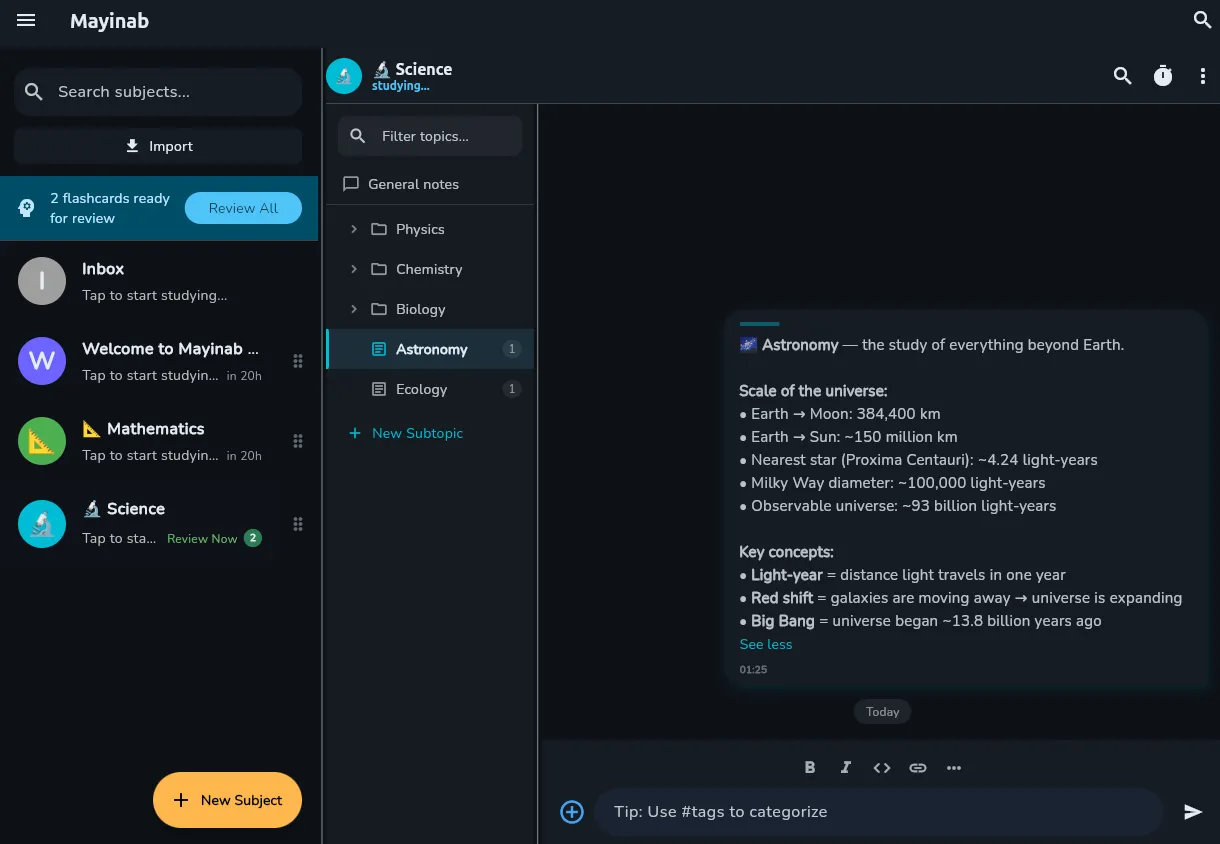
general architecture
mayinab is a flutter app with android, linux and windows support. the main stack is:
- flutter + dart: UI and business logic
- drift (sqlite): local database, generated via code generation
- riverpod: reactive state management
- go_router: declarative navigation
- supabase: optional backend for sync and vault (cloud backup)
- revenuecat: subscription management on android
- stripe: payments on linux/windows
the most important decision i made at the start was that everything works 100% offline, no account, no server. supabase, revenuecat and stripe are optional, they only come in if the user wants to sync backup to the cloud or activate a premium plan. the app opens, u create ur notes and study. period.
this solves the onboarding problem at the root. no "create ur account" screen before using. no mandatory tutorial. no mandatory network permission. u download and start.
code organization
the project follows a feature-based structure:
lib/
  core/          -> utilities, theme, logger, config
  database/      -> drift tables, DAOs, migrations
  features/      -> screens and widgets by feature
    chat/        -> chat-style note thread
    home/        -> subject list
    topic/       -> topic tree
    search/      -> command palette
    explore/     -> content packs
    subscription/
    settings/
  models/        -> DTOs and extensions on drift types
  providers/     -> riverpod providers
  services/      -> business logic (backup, SRS, media, etc.)
  shared/        -> reusable widgets
each feature has its own widgets, and providers are separated by domain. no giant provider file. no god class. (at least in theory. in practice some providers got too fat and need refactoring. honesty above everything.)
performance and isolates
dart runs code on a main thread by default. if u try to compress a 500mb backup or crunch big images directly on it, the UI freezes and the user cant interact with the app.
to keep the app running without freezing, i had to implement background isolates. operations that need heavy processing, like image compression on desktop, creating the zip backup file and storage scanning, run on parallel processes. this way the interface keeps responding instantly while the heavy stuff happens in the background.
i also built a custom lru cache (lib/core/lru_cache.dart) to save data the app accesses all the time, like video thumbnails and link previews. this avoids repeated database queries, reducing cpu usage and saving battery.
database: drift + sqlite
the database is sqlite managed by drift, which generates boilerplate code via build_runner. u define tables as dart classes and it generates types, typesafe queries and DAOs.
the data hierarchy is:
SubjectFolder (folder)
  └── Subject (subject)
        └── Topic (topic, infinitely nestable)
              └── Note (note)
                    └── NoteTag (tag)
topics support infinite nesting via parent_id. u can have Chemistry -> Organic -> Aromatics -> Benzene -> Nitration Mechanism and the app handles it. the topic sidebar renders this as a navigable tree.
notes have 7 types: text, flashcard, image, video, audio, file and checklist. each type uses different columns from the notes table, no separate tables per type. everything goes in the same one, with nullable columns for each case.


full-text search
for search, i use sqlite FTS5, a virtual table created in onCreate:
CREATE VIRTUAL TABLE IF NOT EXISTS notes_fts
USING fts5(content, answer, content='notes', content_rowid='id')
with triggers to keep the index synced on insert, update and delete. works 100% offline, no elasticsearch, no external API. the speed is surprising even with thousands of notes.
migrations
the schema has been through 16 versions already. each migration uses an idempotent ALTER TABLE ADD COLUMN pattern, because sqlite doesnt have ADD COLUMN IF NOT EXISTS, and if the process dies between adding the column and writing user_version, the app crashes on next open with "duplicate column name".
the solution i adopted: wrap each ALTER TABLE in try/catch, and only silence "duplicate column" errors. any other error (missing table, disk full, lock) is rethrown. looks like a hack but its the standard solution in sqlite.
Future<void> _addColumn(String sql) async {
  try {
    await customStatement(sql);
  } catch (e) {
    if (e.toString().toLowerCase().contains('duplicate column')) return;
    rethrow;
  }
}
spaced repetition: real SM-2
the flashcard algorithm is the classic SM-2, based on Wozniak's research from the 80s. anki already migrated to FSRS, which is more accurate, and mayinab will follow that path too.
the user rates the answer on a scale of 0 to 5:
- 0-2 -> failed, resets the interval
- 3 -> hard, but passed
- 4 -> good
- 5 -> easy
the ease factor starts at 2.5 and adjusts every review:
easeFactor = easeFactor + (0.1 - (5 - rating) * (0.08 + (5 - rating) * 0.02));
if (easeFactor < 1.3) easeFactor = 1.3; // minimum
the next interval is calculated like this:
- 1st review -> 1 day
- 2nd review -> 6 days
- following reviews -> previous interval * ease factor
the SrsService is pure: no side effects, no state, no UI dependencies. it receives a note and a rating, and returns a record with the new parameters. this makes testing so much easier.
security and vault encryption
signups on supabase and my own cloud are temporarily disabled, maybe permanently. backup still works normally, u can export to a local file or sync with google drive, for free, without needing any account.
local backup exports a ZIP snapshot of all data and media. the vault (cloud backup) encrypts this snapshot before sending to supabase storage.
the encryption uses PBKDF2-HMAC-SHA256 for key derivation + AES-256-GCM for encryption. GCM is authenticated encryption, if someone tampers with the file or the password is wrong, decrypt throws an exception instead of silently returning garbage.
parameters:
- salt: 16 random bytes (per backup)
- IV: 12 random bytes (per chunk)
- PBKDF2 iterations: 100,000
- derived key: 256 bits
chunked format (v2)
the original format (v1) loaded the entire file into memory before encrypting; a big 500MB backup caused a ~1.5GB RAM spike. v2 processes in 1MB chunks:
[MAGIC "BKC1" (4 B)] [salt (16 B)] [num_chunks (4 B BE)]
{ [cipher_len (4 B BE)] [IV (12 B)] [ciphertext + GCM tag] } x N
each chunk has its own IV. the memory spike drops to approximately input + 1MB. backups larger than ur available memory stop crashing the app. (°ロ°)
v1 format is still supported for reading for backwards compatibility. the code detects the magic header "BKC1" to distinguish formats.
legacy: why AES-CBC existed before
the first version used SHA-256(password) as the key directly (no PBKDF2) + AES-CBC. this is insecure for two reasons: without KDF, key strength is limited by human password entropy; CBC doesnt provide authentication, so corrupted or tampered bytes generate invalid plaintext silently. migrated everything to PBKDF2 + GCM.
privacy and ethics
privacy isnt a feature, its a prerequisite. the app was designed around it:
- no mandatory account: data stays on the device. supabase only comes in if u explicitly activate the vault
- no telemetry: i dont send usage analytics, dont track what u study, dont send anything to any server without consent
- no ads: never. backup is free via google drive or local file
- zero-knowledge backup: the vault encrypts data locally before sending. the server receives encrypted bytes, not even i can read what u saved
- delete account actually works: theres a dedicated SQL script (
supabase_delete_account.sql) that wipes everything. data, files, account. no residual trash
the comparison with competitors is honest. discord is convenient but data goes to their servers without end-to-end encryption. whatsapp has E2E in chat but backups on google drive are unencrypted by default (partially changed in recent versions). notion stores everything on their servers, with no easy self-host option.
im not saying those apps are bad, theyre great for their use cases. but for storing study notes, especially sensitive content like exam materials, military questions or health stuff, privacy matters.
real bugs and challenges
im gonna be transparent. development had bad moments. lots of them. here are the biggest ones:
the navigation freeze (7 tries)
the most tenacious bug ive ever faced. when navigating quickly between subjects and subtopics, the app froze permanently. wasnt lag. was total freeze. had to kill the process.
i tried 6 things that didnt work (replace GptMarkdown, remove IntrinsicWidth, add debounce, add RepaintBoundary...) until finally reading the source code of ChatScrollObserver from the scrollview_observer package. the packages constructor scheduled an addPostFrameCallback that scheduled another one internally, creating an infinite callback loop. the fix was removing ChatScrollObserver entirely. i wrote a whole article about this bug.
flutter 3.38 broke latex
flutter_math_fork v0.7.4 uses a RenderLine class that doesnt implement computeDryBaseline, a method that became mandatory in flutter 3.38. result: 733 errors per frame. the app wouldnt open.
the fix was a workaround that renders latex as italic monospace text instead of formatted equations. ugly, but functional. the packages are unmaintained so theres no waiting for a fix. detailed it here (pt-br).
SSL certificates on windows
dart on windows doesnt automatically trust the system cert store, causing CERTIFICATE_VERIFY_FAILED when connecting to supabase. the temptation is to use badCertificateCallback = (cert, host, port) => true, which accepts any certificate, including from attackers. the microsoft store rejects this too.
the fix was an explicit allowlist of known hosts:
static const _trustedHosts = [
  'supabase.co', 'supabase.com',
  'googleapis.com', 'google.com',
  'cloudflare.com', 'stripe.com',
  'revenuecat.com', 'api.revenuecat.com',
];

client.badCertificateCallback = (cert, host, port) {
  return _trustedHosts.any(
    (trusted) => host == trusted || host.endsWith('.$trusted'),
  );
};
accepts verification failures only on known hosts, rejecting everything else. passed microsoft store review.
migration race condition
during a migration, if the process dies between ALTER TABLE being executed and drift writing the new user_version, the user is left with an inconsistent database. on next open, drift tries to run the migration again and explodes with "duplicate column name".
the _addColumn idempotent workaround already covers 99% of cases, but theres a worse edge case: the database could be at version 12 but missing the column that should have been added in v12. this happens if the process died before ALTER TABLE but after the user_version write. for this, i added a beforeOpen that tries to add the column again (silencing "duplicate column").
multi-platform support
flutter promises "write once, run anywhere", but in practice each platform has its quirks:
- linux: no
flutter_inappwebviewsupport, i had to create a local stub (tool/flutter_inappwebview_linux_stub) so the build wouldnt crash - windows: SSL issues, window manager problems, and the MSIX for microsoft store has its own signing process
- android:
SCHEDULE_EXACT_ALARMpermission was removed bc its not needed and increased scrutiny on the play store - google drive on desktop: the OAuth flow is different from mobile, desktop opens external browser, mobile uses native webview. needed separate services (
google_drive_service.dartandgoogle_drive_service_desktop.dart)
best practices i adopted
the main services (backup, storage, media, subscription) implement interfaces (ISnapshotService, IStorageService, etc.), which allows swapping implementation by platform without changing providers, and testing with fakes without depending on disk or network.
operations that can fail in expected ways use a custom Result<T> type instead of throwing exceptions up the stack. exceptions are for truly unexpected errors.
the SrsService and VaultCrypto are pure: no mutable state, no UI dependencies, no side effects. theres a custom LruCache (lib/core/lru_cache.dart) to cache link previews, thumbnails and search results. each riverpod provider is granular, no centralized AppState.
main features
- 7 note types: text (markdown + latex), flashcard (with rich media: image, local video, youtube), image, video, audio, file and checklist
- infinite topic hierarchy: subject -> topic -> subtopic -> subsubtopic... no depth limit
- slash commands:
/flashcard,/checklist,/image, etc. - full-text search via FTS5, 100% offline
- wiki links:
[[topic name]]without needing to configure anything - scribble pad: freehand drawing board
- OCR via google mlkit
- study statistics and streaks per subject
- configurable pomodoro timer
- flashcard review notifications
- custom themes: light, dark and system
- resizable split view: sidebar + chat side by side
- command palette: ctrl+k
- importable content packs (ex: AWS SAA-C03 with 187 notes and 142 flashcards)
- trash with 30-day auto-purge
- i18n: portuguese and english
what tests i have
the project has unit and integration tests covering:
- SRS service (SM-2 interval calculations)
- flashcard import
- content pack service
- note, search and SRS providers
- note creation flow (DAO)
- wiki links
- utilities
the in-memory database (AppDatabase.forTesting()) ensures DAO tests run without disk and without shared state between tests.
distribution: android, linux and windows
the app was published on the play store in 2026, after a few months of internal testing. theres an AppImage build for linux (single file, no dependencies), MSIX for microsoft store and an inno setup installer for those who prefer no store.
CI/CD is github actions: build, test, and packaging for each platform. the windows pipeline in particular was suffering: flutter clean before rebuild is mandatory to avoid dart-defines cache that made the build use old credentials.
2k downloads in production without spending a single cent on ads. organic growth, word of mouth, and some posts on study forums.
challenges i still have ahead
honesty first:
- iOS: the xcode structure is already in the repo, but publishing on the app store costs $99/year and requires a physical mac in the CI pipeline. not now.
- real-time multi-device sync: today the vault is manual backup. real-time sync would require a considerably more complex conflict resolution system
- unmaintained packages: both
flutter_math_forkand others have irregular maintenance. every flutter update is roulette - performance with many notes: lazy loading works well up to a few thousand. with tens of thousands, probably would need more aggressive virtual scrolling
- accessibility: has basic semantics but is far from complete
building mayinab was, and still is, a personal project born from a real need. i started because available tools were either too complex, careless with privacy, or just plain ugly.
i learned a lot in the process. that multi-platform support in flutter is way more work than the marketing promises, that diy cryptography has real pitfalls, that intermitent bugs are the worst in history, and that 2k people downloading something u built from scratch hits different. (⌐■_■)
the app still has flaws. theres code i look at today and feel embarrassed. but its in production, its being used, and its improving every version.
if u want a study app that opens in 0 seconds of configuration, works offline, doesnt track u and has real encryption on backup: download mayinab.
and if ur a dev and wanna discuss architecture, bugs or flutter in general, hit me up.
✦ ✦